Console Tools
The Asv.Gnss.Shell project contains diagnostic commands implemented with ConsoleAppFramework. Run commands from the repository root.
File message inspector
Open a local recording of any extension and attempt to decode its contents:
RINEX OBS/NAV/MET files are also supported through their native header and record context. For example, use inspect -f "station.rnx". The reader flushes the final RINEX record at EOF. Gzip input is available through the library's RinexFile.Read/ReadAsync API; see RINEX.
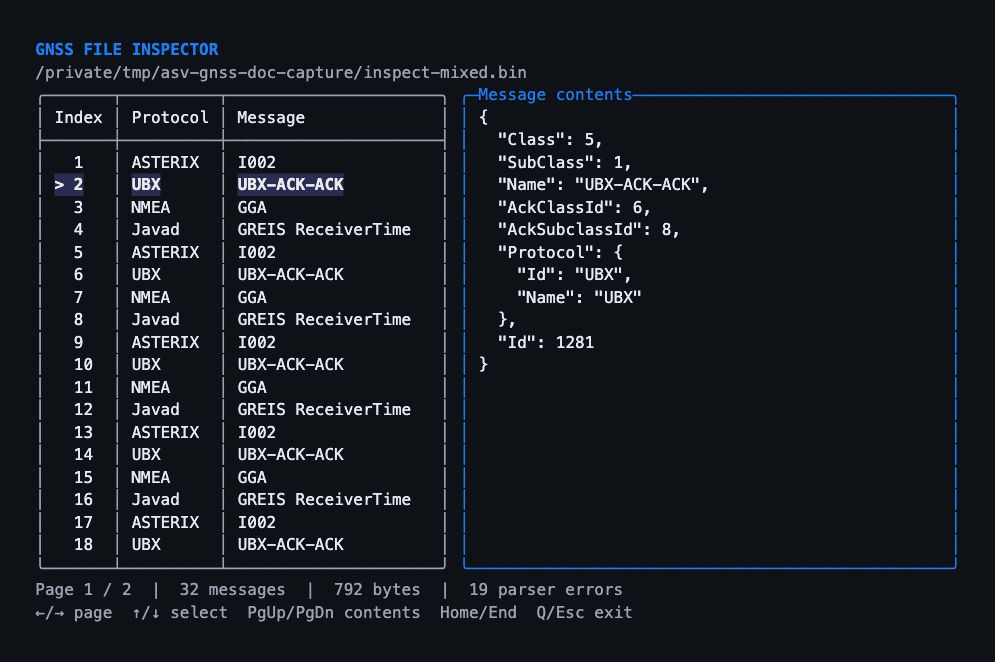
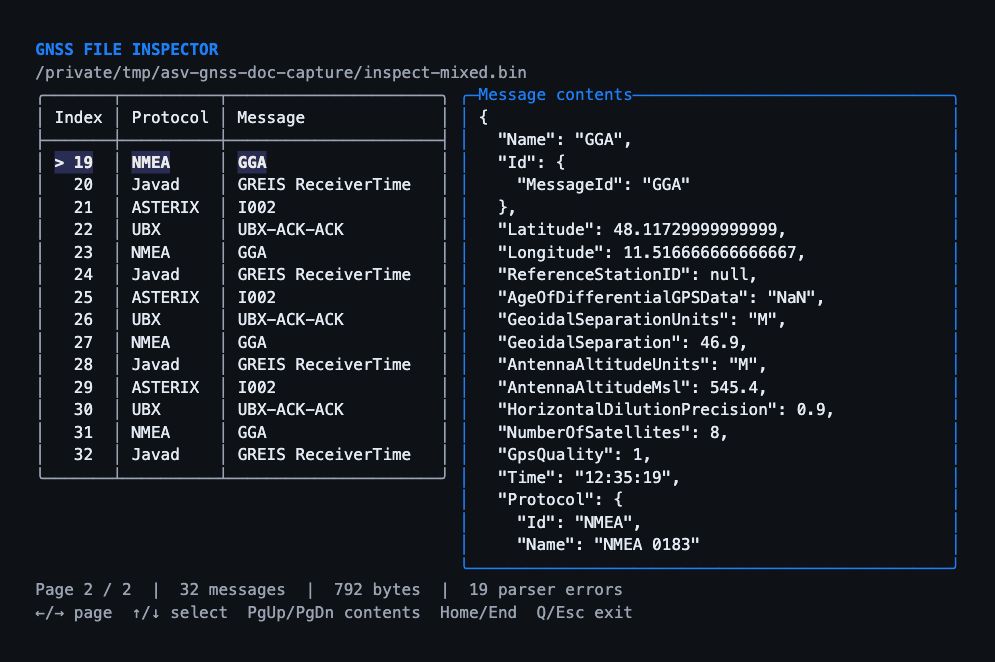
-f is the short form of --file. The centered viewer shows the message index, protocol, and message name in a paginated table. The selected row is highlighted; the panel on the right displays its decoded contents as formatted text.
Key | Action |
|---|---|
Left / Right | Previous / next table page |
Up / Down | Select the previous / next message |
Page Up / Page Down | Scroll the selected message's contents |
Home / End | Select the first / last message |
Q / Escape | Close the viewer |
Ctrl+C | Cancel file parsing or close the viewer |
Resize the terminal to change the page size. The viewer needs at least 64 columns and 14 rows. Redirected input or output produces one static page instead of waiting for keyboard input.
Mixed-protocol example
Create a small demonstration file from the repository root with Python 3:
Save this snippet as create-mixed.py, then run:
The generated file contains 792 bytes and 32 messages, repeating these four reference messages eight times:
Protocol | Message | Example contents |
|---|---|---|
ASTERIX | I002 | Data source SIC |
UBX | UBX-ACK-ACK | Acknowledges class |
NMEA | GGA | Latitude |
Javad GREIS | GREIS ReceiverTime | Raw time of day |
The following screenshots show the command's actual terminal output at 100 columns by 28 rows, with 18 messages per page. The parser-error counter includes rejected candidates from other formats; it can be nonzero even when all 32 reference messages are recognized.
On the first page, press Down once to select message 2. Its UBX acknowledgement fields appear in the panel on the right:
Press Right, then Up, to reach message 19 on the second page. The panel now shows the selected NMEA GGA message, while the table continues the mixed sequence:
Decoding behavior and limitations
The command streams the file through all implemented stream protocols: NMEA, RTCM v2/v3, UBX, ASTERIX, ASV, GBAS, SBF, ComNav binary/ASCII/simple answers, and Javad GREIS. It retains recognized messages for browsing, so memory use depends on their number and payload sizes. There is no extension-based format restriction. Noise, unknown message IDs, unsupported payload revisions, and incomplete trailing packets can remain undecoded. The parser-error count reports decoding attempts, not a count of damaged packets in the file.
ASTERIX candidates are located independently at registered category/length boundaries, including after unrelated bytes. For discovery, the first record must include a data-source identifier, all records must contain fields, and the decoded size must match the declared length. ASTERIX has no checksum or unique synchronization marker, so plausible candidates in arbitrary binary data can be ambiguous. Container metadata is not interpreted by this command; use asterix-stream for ASTERIX container statistics and KML export.
ADS-B AVR/Beast receiver streams are included through the native ADS-B parser. The standalone GPS LNAV and GLONASS FDMA bit-stream parsers require explicit registration on suitable navigation streams; they are not included in this command's mixed-file detection. In particular, GLONASS Hamming checks alone cannot reliably distinguish navigation strings from arbitrary binary data. Navigation words inside receiver messages remain decoded. The details panel shows model properties and records, not original wire bytes. Very large or deeply nested details are explicitly truncated for display; unreadable computed properties are reported without preventing other fields from being shown.
RTCM v3 stream
Read an RTCM v3 stream from a connection string:
The command registers the RTCM v3 protocol, opens the input port, and also opens a local TCP server port:
Use tcps://host:port when the shell should listen for incoming TCP clients instead of connecting to a remote endpoint.
ASTERIX stream statistics
Parse an ASTERIX .stream file and print frame statistics:
ASTERIX KML export
Export CAT021 tracks from an ASTERIX stream to KML:
The KML export is best-effort: invalid or incomplete CAT021 records are skipped while stream validation and category statistics still run.
NMEA command status
NmeaCommand exists in the project, but it is currently not registered in Program.cs. Register app.Add<NmeaCommand>(); before using the nmea command from the shell.