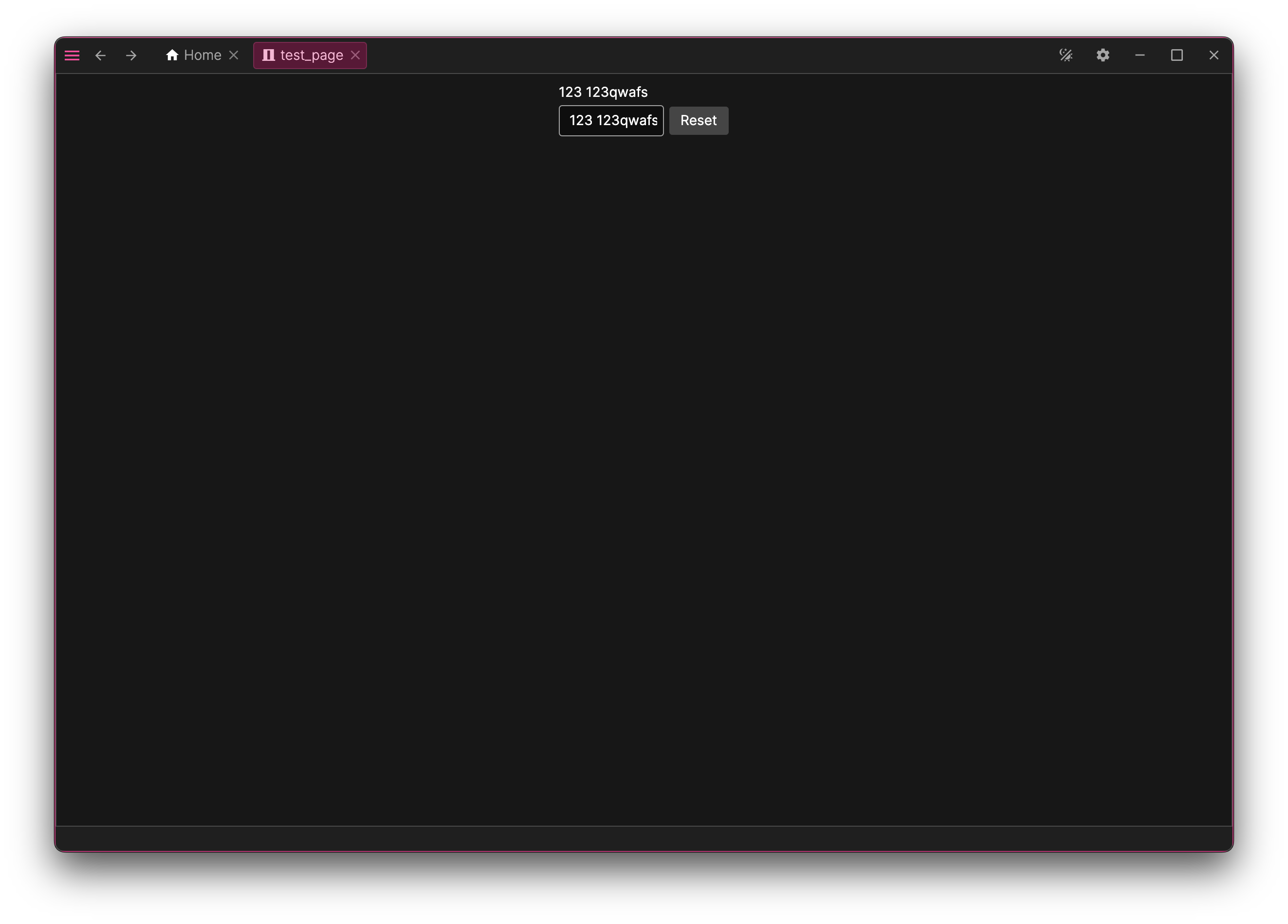
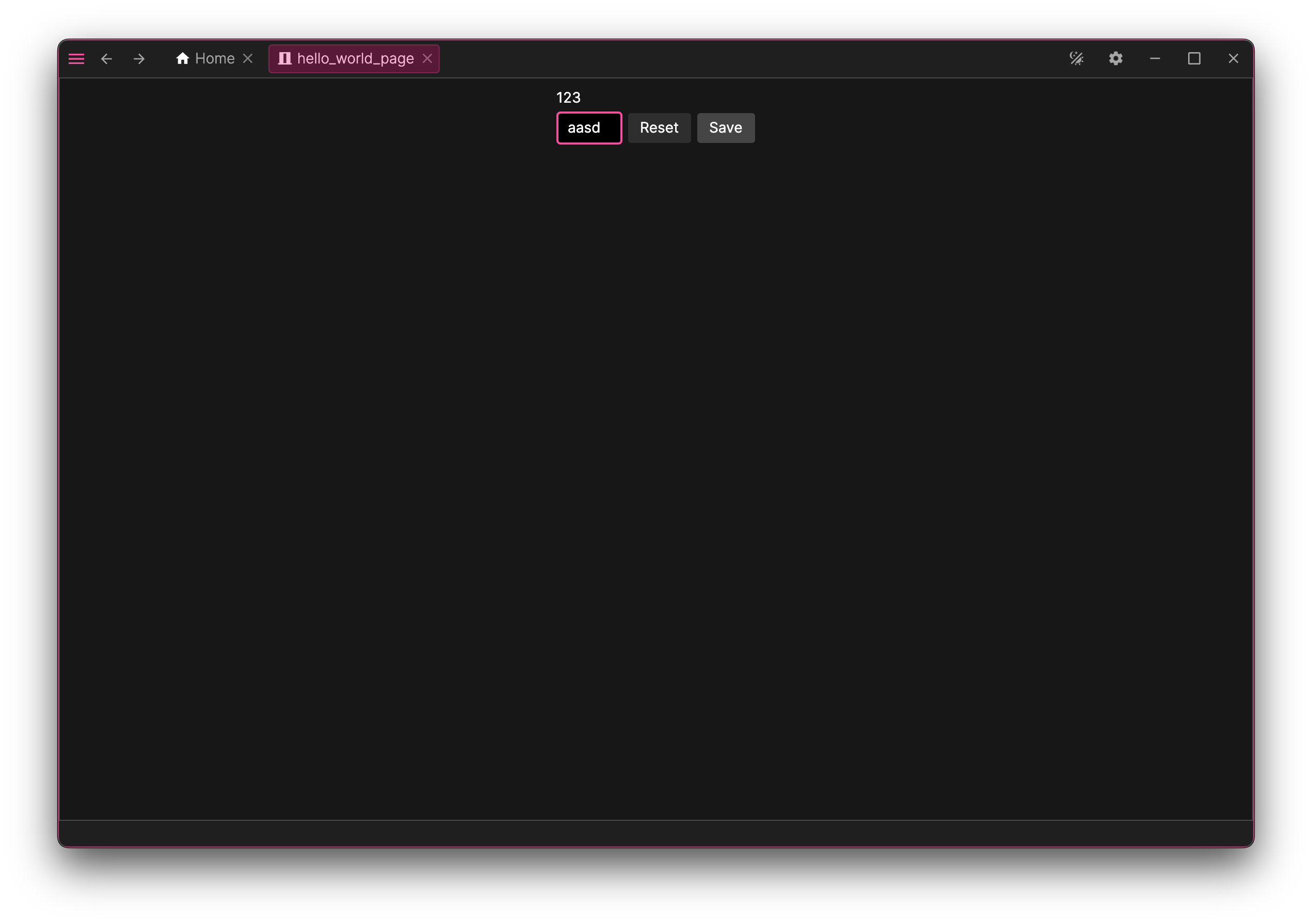
By the end of this guide, you’ll have a customized HelloWorldPage. We will start with a simple reactive example, and then upgrade it to support Undo/Redo functionality.
First, update the View Model HelloWorldPageViewModel.cs. We need to add a property to hold the text string.
public HelloWorldPageViewModel(
IPageContext context,
ILoggerFactory loggerFactory,
IDialogService dialogService,
IExtensionService ext) : base(PageId, context, loggerFactory, dialogService, ext)
{
// Initialize it in the constructor
Text = new BindableReactiveProperty<string>(string.Empty).DisposeItWith(Disposable);
}
// Add a property
public BindableReactiveProperty<string> Text { get; }
Next, update the template (HelloWorldPage.axaml) to bind to this property:
We have created a binding between the UI elements and our property. If you run the app now and type in the TextBox, the TextBlock will update instantly to match.
Adding a Command (Button)
Now let's create a button to reset the text. Add a command property to the View Model:
public HelloWorldPageViewModel(
IPageContext context,
ILoggerFactory loggerFactory,
IDialogService dialogService,
IExtensionService ext) : base(PageId, context, loggerFactory, dialogService, ext)
{
// Initialize it in the constructor
Text = new BindableReactiveProperty<string>(string.Empty).DisposeItWith(Disposable);
ResetTextCommand = new ReactiveCommand(_ =>
{
Text.Value = string.Empty;
}).DisposeItWith(Disposable);
}
// A new property
public ReactiveCommand ResetTextCommand { get; }
public BindableReactiveProperty<string> Text { get; }
You can now run the app and test the new functionality.
We now have a functional app with standard reactive properties from R3.
However, let's make the page more interesting by adding Undo/Redo support.
We will make the text input support "Undo/Redo" (historical property).
We will change the logic so the text block only updates when we hit "Save", and that "Save" action can also be undone/redone.
Using Historical Properties
First, let's handle the text input. We want to be able to undo typing in the TextBox. To do this, we use a HistoricalStringProperty.
Update your View Model properties:
// A new field
private readonly ReactiveProperty<string?> _inputText;
public HelloWorldPageViewModel(
IPageContext context,
ILoggerFactory loggerFactory,
IDialogService dialogService,
IExtensionService ext) : base(PageId, context, loggerFactory, dialogService, ext)
{
Text = new BindableReactiveProperty<string>(string.Empty).DisposeItWith(Disposable);
// Initialize them in the constructor
_inputText = new ReactiveProperty<string?>().DisposeItWith(Disposable);
InputText = new HistoricalStringProperty(nameof(InputText), _inputText, loggerFactory)
.SetRoutableParent(this)
.DisposeItWith(Disposable);
ResetTextCommand = new ReactiveCommand(_ =>
{
Text.Value = string.Empty;
}).DisposeItWith(Disposable);
}
// A new property
public HistoricalStringProperty InputText { get; }
public ReactiveCommand ResetTextCommand { get; }
public BindableReactiveProperty<string> Text { get; }
We must also expose this property in GetChildren. Together with SetRoutableParent, this makes the property a part of the view model tree: the undo history records which component produced each change and finds it again by walking this tree when you press Undo.
public HistoricalStringProperty InputText { get; }
public ReactiveCommand ResetTextCommand { get; }
public override IEnumerable<IViewModel> GetChildren()
{
// Expose the property
yield return InputText;
}
protected override void AfterLoadExtensions()
{
}
Now, update the XAML. Note that for historical properties, we usually bind to ViewValue.Value:
If you run the app now, you can type in the text field and use Ctrl+Z to undo (or Ctrl+Y to redo) your typing changes.
Making the Save Action Undoable
Now let's implement the "Save" button. When clicked, it copies the input text into the text block. We want to be able to Undo/Redo this "Save" action.
How Undo/Redo works
Every view model has an Undo controller where its components register the changes they can revert. Historical properties do this automatically — that is why typing in the InputText field is already undoable.
For our own property we can use Undo.TrackProperty: it watches a reactive property and publishes every change of its value to the undo system. Each published change travels up the view model tree to the page, which stores it in its UndoHistory. When you press Undo, the page pops the last change and asks the component that produced it to revert the value.
Tracking the property
First, rename our original Text property to SavedText and start tracking it. Then add the new Save command. The Reset command keeps working with the same property, so both actions become undoable:
public HelloWorldPageViewModel(
IPageContext context,
ILoggerFactory loggerFactory,
IDialogService dialogService,
IExtensionService ext) : base(PageId, context, loggerFactory, dialogService, ext)
{
// A renamed property
SavedText = new BindableReactiveProperty<string>(string.Empty).DisposeItWith(Disposable);
// Publish every change of SavedText to the undo system
Undo.TrackProperty(nameof(SavedText), SavedText).DisposeItWith(Disposable);
_inputText = new ReactiveProperty<string?>().DisposeItWith(Disposable);
InputText = new HistoricalStringProperty(nameof(InputText), _inputText, loggerFactory)
.SetRoutableParent(this)
.DisposeItWith(Disposable);
// A new command
SaveTextCommand = new ReactiveCommand(_ =>
{
// The change is recorded automatically because the property is tracked
SavedText.Value = InputText.ModelValue.Value ?? string.Empty;
}).DisposeItWith(Disposable);
ResetTextCommand = new ReactiveCommand(_ =>
{
SavedText.Value = string.Empty;
}).DisposeItWith(Disposable);
}
// A renamed property
public BindableReactiveProperty<string> SavedText { get; }
public HistoricalStringProperty InputText { get; }
public ReactiveCommand ResetTextCommand { get; }
// A new property
public ReactiveCommand SaveTextCommand { get; }
Final XAML Update
Finally, update the template to bind to the new properties and add the Save button:
using System;
using System.Threading.Tasks;
using Asv.Avalonia;
using Avalonia;
using Avalonia.Controls;
namespace AsvAvaloniaTest;
class Program
{
// Initialization code. Don't use any Avalonia, third-party APIs or any
// SynchronizationContext-reliant code before AppMain is called: things aren't initialized
// yet and stuff might break.
[STAThread]
public static void Main(string[] args)
{
try
{
BuildAvaloniaApp()
.StartWithClassicDesktopLifetime(args, ShutdownMode.OnMainWindowClose);
AppHost.Instance.StopAsync().GetAwaiter().GetResult();
Task.Factory.StartNew(AppHost.Instance.Dispose).GetAwaiter().GetResult();
}
catch (Exception e)
{
AppHost.HandleApplicationCrash(e);
}
}
// Avalonia configuration, don't remove; also used by visual designer.
public static AppBuilder BuildAvaloniaApp()
=> AppBuilder.Configure<App>()
.UsePlatformDetect()
.WithInterFont()
.LogToTrace()
.UseAsv(builder =>
{
builder
.RegisterDefault()
.RegisterDesktopShell();
builder.Pages.Register<HelloWorldPageViewModel, HelloWorldPage>(HelloWorldPageViewModel.PageId);
builder.Extensions.Register<IHomePage, HomePageHelloWorldPageExtension>();
});
}
using Asv.Avalonia;
using Avalonia.Markup.Xaml;
namespace AsvAvaloniaTest;
public class App : AsvApplication
{
public override void Initialize()
{
AvaloniaXamlLoader.Load(this);
}
}
using Avalonia.Controls;
namespace AsvAvaloniaTest;
public partial class HelloWorldPage : UserControl
{
public HelloWorldPage()
{
InitializeComponent();
}
}
using System.Collections.Generic;
using Asv.Avalonia;
using Asv.Common;
using Asv.Modeling;
using Microsoft.Extensions.Logging;
using R3;
namespace AsvAvaloniaTest;
// The View Model must implement a basic page class (e.g., PageViewModel or TreePageViewModel)
public class HelloWorldPageViewModel : PageViewModel<HelloWorldPageViewModel>
{
// A unique ID for the page, used for routing
public const string PageId = "hello_world_page";
private readonly ReactiveProperty<string?> _inputText;
// Dependencies are injected via the constructor from the DI container
public HelloWorldPageViewModel(
IPageContext context,
ILoggerFactory loggerFactory,
IDialogService dialogService,
IExtensionService ext) : base(PageId, context, loggerFactory, dialogService, ext)
{
SavedText = new BindableReactiveProperty<string>(string.Empty).DisposeItWith(Disposable);
// Publish every change of SavedText to the undo system
Undo.TrackProperty(nameof(SavedText), SavedText).DisposeItWith(Disposable);
_inputText = new ReactiveProperty<string?>().DisposeItWith(Disposable);
InputText = new HistoricalStringProperty(nameof(InputText), _inputText, loggerFactory)
.SetRoutableParent(this)
.DisposeItWith(Disposable);
SaveTextCommand = new ReactiveCommand(_ =>
{
// The change is recorded automatically because the property is tracked
SavedText.Value = InputText.ModelValue.Value ?? string.Empty;
}).DisposeItWith(Disposable);
ResetTextCommand = new ReactiveCommand(_ =>
{
SavedText.Value = string.Empty;
}).DisposeItWith(Disposable);
}
public BindableReactiveProperty<string> SavedText { get; }
public HistoricalStringProperty InputText { get; }
public ReactiveCommand ResetTextCommand { get; }
public ReactiveCommand SaveTextCommand { get; }
// If this page contains other routable components (e.g., historical properties
// or a list with custom VMs), return them here
public override IEnumerable<IViewModel> GetChildren()
{
yield return InputText;
}
// This method runs after all extensions have been applied to the page
protected override void AfterLoadExtensions()
{
}
}
using Asv.Avalonia;
using Asv.Common;
using Asv.Modeling;
using Material.Icons;
using R3;
namespace AsvAvaloniaTest;
public class HomePageHelloWorldPageExtension : IExtensionFor<IHomePage>
{
// A unique ID for the extension
public const string StaticId = "ext.home.hello-world";
string ISupportId<string>.Id => StaticId;
public void Extend(IHomePage context, CompositeDisposable contextDispose)
{
var action = new ActionViewModel("open-hello-world")
{
Header = "Open HelloWorldPage",
Description = "Opens HelloWorldPage",
Icon = MaterialIconKind.Abacus, // The icon will be used in the tools list
Command = new ReactiveCommand(_ =>
context.GoTo(new NavPath(new NavId(HelloWorldPageViewModel.PageId)))
).DisposeItWith(contextDispose),
}.DisposeItWith(contextDispose);
context.Tools.Add(action);
}
}