Asv.Avalonia.Docs Help

Make Module truly modular

The key feature of modules is the ability to be disabled entirely or partially. Currently, the module cannot do this, so we need to extend its capabilities.

Adding AppHost extension

Create an AppHost folder in the root directory of Asv.Avalonia.Module. Inside this folder, add three files: ModuleModuleMixin, ModuleModuleOptionsBuilder, and ModuleModuleOptions.

ModuleModuleOptions

In this file, we define the configuration options for the module. These options will later be used by the builder.

public class ModuleModuleOptions { public const string Section = "GeoMap"; // Section for the IServiceCollection public required bool IsEnabled { get; set; } }

ModuleModuleOptionsBuilder

Add one base method for the builder. We will extend this class later, but for now this method is enough.

internal OptionsBuilder<ModuleModuleOptions> Build(OptionsBuilder<ModuleModuleOptions> options) { return options.Configure(config => { config.IsEnabled = true; }); }

ModuleModuleMixin

This file extends the builder in Program.cs. We use this method to set up our module.

public static class ModuleModuleMixin { public static IHostApplicationBuilder UseModuleModule(this IHostApplicationBuilder builder) { var options = builder .Services.AddOptions<ModuleModuleOptions>() .Bind(builder.Configuration.GetSection(ModuleModuleOptions.Section)); var subBuilder = new ModuleModuleBuilder(); subBuilder.Build(options); return builder; } }

Adding useful extension

We want to provide users with the simplest and best possible experience. Therefore, we will create a useful, but completely optional, extension method. This method will have preconfigured exports for our Module.

Go to the ModuleModule.cs and the following code:

public static class ContainerConfigurationMixin { public static ContainerConfiguration WithDependenciesFromModuleModule( this ContainerConfiguration containerConfiguration ) { if (Design.IsDesignMode) { return containerConfiguration.WithAssemblies([typeof(ModuleModule).Assembly]); } var exceptionTypes = new List<Type>(); var options = AppHost.Instance.GetService<IOptions<ModuleModuleOptions>>().Value; if (!options.IsEnabled) { // if the module is disabled, we should remove all the dependencies from the export exceptionTypes.AddRange(typeof(ModuleModule).Assembly.GetTypes()); } var typesToExport = typeof(ModuleModule).Assembly .GetTypes() .Except(exceptionTypes); return containerConfiguration.WithParts(typesToExport); } }

Adding modularity to the app

Now our module is fully modular, and we need to enable it in the application.

Go to the Program.cs and add the following line to the builder:

.UseModuleModule()

Then go to the App.axaml.cs and change

.WithAssemblies([typeof(ModuleModule).Assembly])

to

.WithDependenciesFromModuleModule()

Run the application. You should see the Cats page.

Now remove UseModuleModule from the builder, .WithDependenciesFromModuleModule() from App.axaml.cs, or both. Run the application again. The page should no longer be visible.

If you did everything right, now your module meets our standards for modules. Next we will show you how to extend your module and add more settings to it so that you will be able to split your module into smaller parts.

Extending the module

We have already implemented the basic module structure with some simple features. In this section we are going to extend our module with new features. We will also add new settings to the builder. This section is useful if you want to add to your module optional features.

Adding a new page

We want to provide additional customization options for the user. Let's add the ability to open a page with dogs.

Download a picture with dogs from the internet.

Add a new picture to the assets folder.

new-pictures

Create a new View and ViewModel for the dogs page. We will skip the details of this step as it is similar to the Cats page implementation.

You can copy the following code to the files:

<UserControl xmlns="https://github.com/avaloniaui" xmlns:x="http://schemas.microsoft.com/winfx/2006/xaml" xmlns:d="http://schemas.microsoft.com/expression/blend/2008" xmlns:mc="http://schemas.openxmlformats.org/markup-compatibility/2006" xmlns:module="clr-namespace:Asv.Avalonia.Module" mc:Ignorable="d" d:DesignWidth="800" d:DesignHeight="450" x:Class="Asv.Avalonia.Module.DogsPageView" x:DataType="module:DogsPageViewModel"> <Design.DataContext> <module:DogsPageViewModel/> </Design.DataContext> <Grid> <Image Source="{CompiledBinding SelectedImage}" HorizontalAlignment="Center" VerticalAlignment="Center"/> </Grid> </UserControl>
[ExportViewFor<DogsPageViewModel>] public partial class DogsPageView : UserControl { public DogsPageView() { InitializeComponent(); } }
using System.Composition; using Asv.Common; using Avalonia.Media; using Avalonia.Media.Imaging; using Avalonia.Platform; using Material.Icons; using Microsoft.Extensions.Logging; namespace Asv.Avalonia.Module; [ExportPage(PageId)] public class DogsPageViewModel : PageViewModel<DogsPageViewModel> { public const string PageId = "dogs"; public const MaterialIconKind PageIcon = MaterialIconKind.Dog; public const AsvColorKind PageIconColor = AsvColorKind.Info7; public DogsPageViewModel() : this(DesignTime.CommandService, DesignTime.LoggerFactory, DesignTime.DialogService) { DesignTime.ThrowIfNotDesignMode(); } [ImportingConstructor] public DogsPageViewModel( ICommandService cmd, ILoggerFactory loggerFactory, IDialogService dialogService) : base(PageId, cmd, loggerFactory, dialogService) { var stream = AssetLoader .Open(new Uri("avares://Asv.Avalonia.Module/Assets/dog.jpg")) .DisposeItWith(Disposable); var defaultPicture = new Bitmap(stream).DisposeItWith(Disposable); SelectedImage = defaultPicture; } public IImage? SelectedImage { get; private init => SetField(ref field, value); } public override IEnumerable<IRoutable> GetChildren() { return []; } protected override void AfterLoadExtensions() { // ignore } public override IExportInfo Source => ModuleModule.Instance; }
using System.Composition; using Asv.Common; using Microsoft.Extensions.Logging; using R3; namespace Asv.Avalonia.Module; [ExportExtensionFor<IHomePage>] [method: ImportingConstructor] public sealed class HomePageDogsPageExtension(ILoggerFactory loggerFactory) : AsyncDisposableOnce, IExtensionFor<IHomePage> { public void Extend(IHomePage context, CompositeDisposable contextDispose) { context.Tools.Add( OpenDogsPageCommand .StaticInfo .CreateAction(loggerFactory) .DisposeItWith(contextDispose) ); } }
using System.Composition; namespace Asv.Avalonia.Module; [ExportCommand] [method: ImportingConstructor] public class OpenDogsPageCommand(INavigationService nav) : OpenPageCommandBase(DogsPageViewModel.PageId, nav) { public override ICommandInfo Info => StaticInfo; #region Static public const string Id = $"{BaseId}.open.dogs"; public static readonly ICommandInfo StaticInfo = new CommandInfo { Id = Id, Name = "Open dogs page", Description = "Command opens dogs page", Icon = DogsPageViewModel.PageIcon, IconColor = DogsPageViewModel.PageIconColor, DefaultHotKey = null, Source = ModuleModule.Instance, }; #endregion }

Adding options to the builder

Add new options to the ModuleModuleOptions:

... public required bool IsDogsPageEnabled { get; set; } public required bool IsCatsPageEnabled { get; set; } }

Extending ModuleModuleOptionsBuilder

public class ModuleModuleOptionsBuilder { private bool _isCatsPageEnabled; private bool _isDogsPageEnabled; internal ModuleModuleOptionsBuilder() { } internal ModuleModuleOptionsBuilder(ModuleModuleOptions defaultOptions) { _isCatsPageEnabled = defaultOptions.IsCatsPageEnabled; _isDogsPageEnabled = defaultOptions.IsDogsPageEnabled; } public ModuleModuleOptionsBuilder WithCats() { _isCatsPageEnabled = true; return this; } public ModuleModuleOptionsBuilder WithDogs() { _isDogsPageEnabled = true; return this; } internal OptionsBuilder<ModuleModuleOptions> Build(OptionsBuilder<ModuleModuleOptions> options) { return options.Configure(config => { config.IsDogsPageEnabled = _isDogsPageEnabled; config.IsCatsPageEnabled = _isCatsPageEnabled; config.IsEnabled = true; }); } }

Changing ModuleModuleMixin to use the new options

We need to change the builder extension to use our new options. Here we will show you the advanced version of the builder extension that can take default options from the app.settings.json.

public static IHostApplicationBuilder UseModuleModule( this IHostApplicationBuilder builder, Action<ModuleModuleOptionsBuilder>? configure = null ) { var options = builder .Services.AddOptions<ModuleModuleOptions>() .Bind(builder.Configuration.GetSection(ModuleModuleOptions.Section)); var defaultOptions = builder .Configuration.GetSection(ModuleModuleOptions.Section) .Get<ModuleModuleOptions>(); var optionsBuilder = defaultOptions is null ? new ModuleModuleOptionsBuilder() : new ModuleModuleOptionsBuilder(defaultOptions); if (configure is null) { return builder; } configure.Invoke(optionsBuilder); optionsBuilder.Build(options); return builder; }

Extending useful extension

Go to the ModuleModule.cs and add the following code:

... // New code else if (!options.IsDogsPageEnabled) { // if we disable the dogs page, we should remove all dependencies for this page exceptionTypes.AddRange([ typeof(DogsPageView), typeof(DogsPageViewModel), typeof(HomePageDogsPageExtension), typeof(OpenDogsPageCommand) ]); } else if (!options.IsCatsPageEnabled) { // if we disable the cats page, we should remove all dependencies for this page exceptionTypes.AddRange([ typeof(CatsPageView), typeof(CatsPageViewModel), typeof(HomePageCatsPageExtension), typeof(OpenCatsPageCommand) ]); } // var typesToExport = typeof(ModuleModule).Assembly .GetTypes() .Except(exceptionTypes); ...

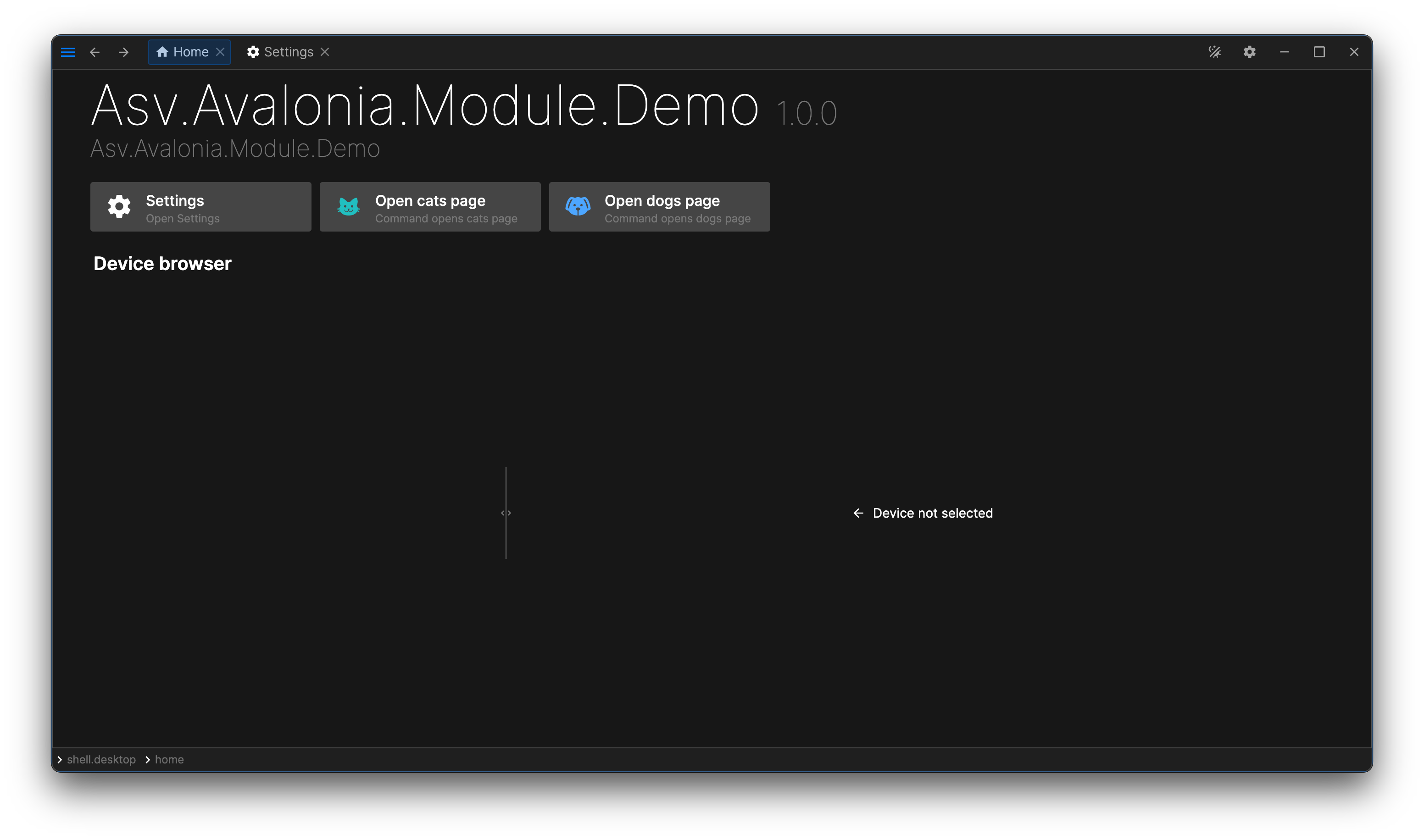
Now you can run the application and see that all pages are disabled. To enable them, modify the UseModuleModule call in Program.cs as follows:

.UseModuleModule(opt => opt.WithCats().WithDogs())

You should now see both pages. Each page can be enabled or disabled individually.

dogs-and-cats-pages

The next step is to make a NuGet package of your module.

Last modified: 18 January 2026